


An Overview of Construction Software Development Trends for 2027 and a 90-Day Plan to Act on Them
 Andrew BurakCEO and Founder at Relevant Software
Does any of this sound familiar?
- Estimators, project managers and accountants retype the same numbers into different systems.
- The weekly owner report takes hours to put together by hand.
- Change orders reach accounting late, so invoices go out late too.
- Field hours get keyed into payroll twice, and mistakes surface on payday.
- Cost overruns show up after the job is done, when it’s too late to fix them.
The good news: all of these problems come from one place and most of the trends shaping construction software in 2027 are different ways of solving this exact problem.
Your competitors are already working on it. In ServiceTitan’s survey of 1,000+ commercial construction leaders, 38% of contractors reported measurable business impact from AI in 2026, up from 17% a year earlier. In Mastt’s 2026 study, 61.1% of project managers say AI saves them at least 10% of their time on a task.
In this article, Relevant Software reviews the upcoming trends in the construction industry, explains how each one works on real projects, and shows construction software development cases we’ve delivered. You’ll also find a 90-day plan for connecting the tools you already have.
Key takeaways
- Construction firms are replacing point tools with unified platforms that share one data model across office, field and equipment.
- AI has moved past pilots into estimating, bidding and reporting. AI agents for RFIs and submittals come next.
- Field apps win or lose on offline mode and how fast a crew can log a task.
- Most failed rollouts stall on integration with legacy ERP and on poor data, not on missing features.
- Map your whole tool stack first, then connect the most expensive hand-off on one live project and measure it for 90 days.
The state of construction software going into 2027
Most construction companies already own plenty of software. The trouble is how it fits together. Estimating sits in one tool, scheduling in another, time tracking in a third, and accounting in an ERP that was configured a decade ago. Every handoff between them is a person retyping numbers.
That retyping has a price. Every manual hand-off is a chance for a wrong number to reach payroll, an invoice or the owner report, and errors found late turn into rework.
Three pressures are pushing firms to fix this now:
- Clients write digital delivery into contracts. Standards like ISO 19650 now show up in owner requirements, especially on public and regulated projects.
- Skilled labor keeps getting scarcer. When an experienced superintendent retires, the knowledge in their head leaves too, unless it sits in a system.
- Margins on commercial work stay thin, so a few points saved on rework or bid accuracy decide whether a job pays.
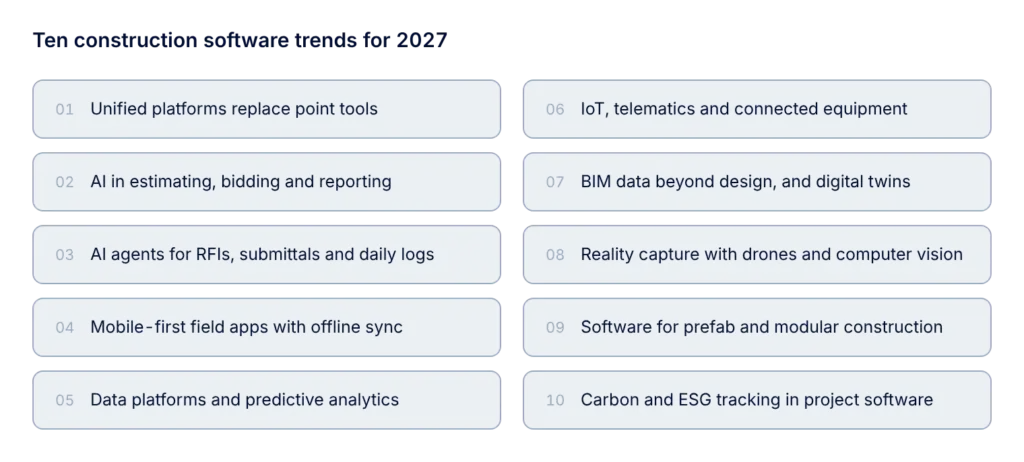
Top construction software trends for 2027
Relevant Software’s project portfolio reflects the same shift. Earlier custom software development engagements in construction usually focused on a single standalone application.
Today, most requests start with integration: connecting the systems a contractor already uses and making their data available for reporting and decisions. Even a new construction project management software development project now begins with an integration map that defines which systems the platform must exchange data with.
1. Unified platforms replace disconnected point tools
Consolidation tops the list for 2027. Contractors are moving off a patchwork of estimating, scheduling, field and accounting tools onto platforms that share one data model, known as a common data environment (CDE). The goal is one version of the project: a change made in the field shows up in the schedule, the budget and the owner report without anyone retyping it.
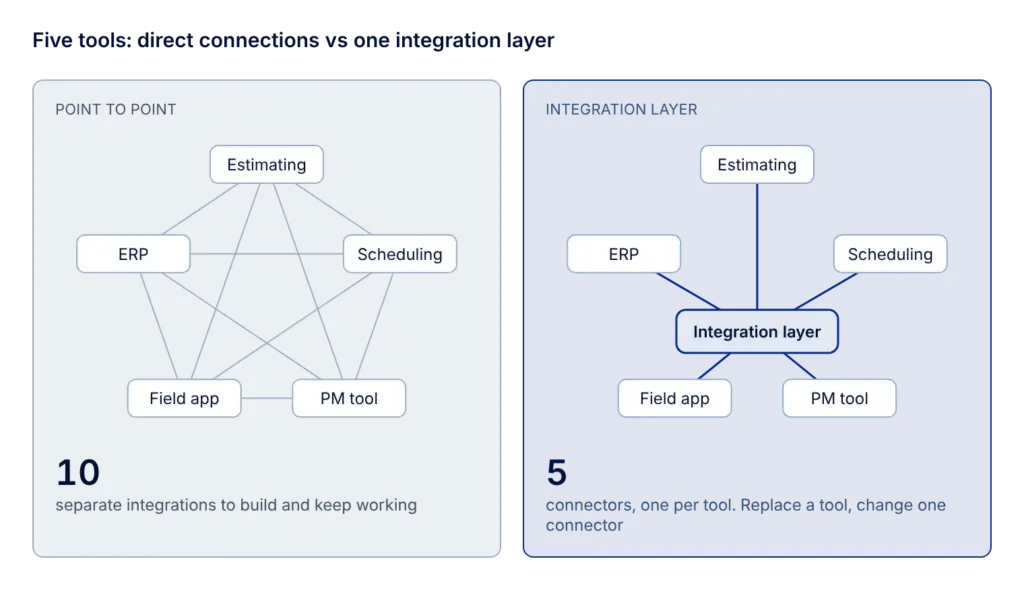
Few contractors can replace every tool at once, so most of the work is software integration. Connecting an existing construction stack usually follows few steps, and each one changes something for the business:
- Pick a system of record for each type of data. If two systems both hold “the budget”, an integration will not understand which number is right, and the conflict just moves from people to software. Once ownership is settled, finance, project managers and the owner report all show the same budget, and the weekly reconciliation of spreadsheets goes away.
- Build an integration layer. A middleware or API layer translates between systems and logs every sync. The reason is maintenance cost: with five tools, connecting each pair directly means up to ten separate integrations to build and keep working, while a central layer needs one connector per tool. When one tool gets replaced, only its connector changes, so the company can switch vendors without rebuilding everything else.
- Sync in both directions where the work happens. A change order approved in the PM tool updates the budget in the ERP and the owner report, and actual costs from the ERP flow back to the project dashboard. With a one-way sync, project managers see the budget but not the actual spend. With both directions, they see margin erosion while the job is still running, when there’s time to renegotiate a change order or adjust crews.
- Monitor the connections. A dashboard shows failed syncs and sends alerts. Integrations often fail silently, for example after a password expires or a vendor renames a field in an update. Without monitoring, the break shows up at month-end close, when payroll or invoices don’t match. With it, the problem gets fixed within hours, before wrong data spreads to other systems.
2. AI moves from pilots into estimating, bidding and reporting
Where do contractors actually use AI? Cost estimation and budgeting and bid management lead the list in ServiceTitan’s 2026 survey. Project managers are even further along: in Mastt’s 2026 study, 72.2% use AI at least weekly, and 84.3% say reporting is where it could add the most value.
In our client projects, AI works best inside a workflow people already use. Here’s how an AI feature for estimating or bidding usually gets built, and what each step gives the business:
- Collect the company’s own history. Past estimates, final costs and bid results (won or lost) are pulled from the estimating tool and the ERP and mapped to one cost code structure. The model then learns from the company’s real pricing, not from generic industry data.
- Start with assistive features. The first release suggests unit costs from comparable past jobs, flags line items that deviate from history and extracts quantities and scope from bid documents. The estimator reviews and approves every suggestion, so estimates get faster without losing accountability.
- Embed it in the existing tool. Through AI integration, suggestions appear inside the estimating or bidding software the team already uses. Nobody has to learn a new tool, which keeps adoption high.
- Measure the result. Estimate preparation time, bid-hit rate and the gap between estimated and actual cost on won jobs are tracked before and after launch. Management sees whether the feature pays for itself.
Bidding makes a good starting point, since the data is structured and the payoff is easy to measure. Working with the Biderator tendering platform, our team shipped a live bidding MVP in 4 weeks, and the client reports 60% less time spent on contractor outreach and bid coordination.
3. AI agents take over RFIs, submittals, change orders and daily logs
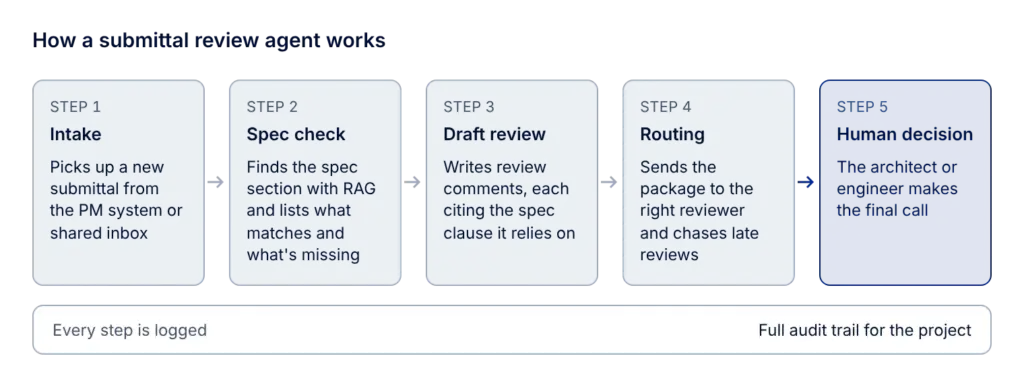
Every construction project produces a constant stream of RFIs, submittals, change orders, meeting minutes and daily logs, and most of the work around them is reading, routing and chasing replies. That’s where AI agent development pays off first. Here’s how a submittal review agent works:
- Intake. The agent picks up a new submittal from the PM system or a shared inbox and reads the attached product data and shop drawings.
- Spec check. It retrieves the relevant specification section from the project documents with RAG development techniques and lists what matches and what’s missing: a data sheet, a fire rating, a certificate that has expired.
- Draft review. The agent prepares review comments, each one citing the spec clause it relies on.
- Routing and follow-up. It sends the package to the right reviewer with a short summary, tracks the due date and reminds people when a review runs late.
- Human decision. The architect or engineer makes the final call. The agent logs every step, so the project has a full audit trail.
For the business, reviewers start from a pre-checked package, gaps get caught before the first submission, and fewer submittals bounce back for a second round. Adoption is still early: only 9.3% of project managers in Mastt’s study use AI agents today, while 46.3% plan to start. And 29.6% name accuracy and trust as their biggest barrier, which is exactly why citations and human approval are built into steps 2 and 5.
4. Mobile-first field apps with offline sync
If a foreman can’t log hours with gloves on, or the app freezes in a basement with no signal, the crew goes back to paper by Friday. Field apps are judged on the jobsite, so mobile app development for construction in 2027 starts there. A field app that crews keep using usually includes these parts, each with a clear business effect:
- Offline-first storage. Entries are saved on the device and synced through a queue once the connection returns. Crews keep working in basements, tunnels and remote sites, and no entry gets lost.
- Photo capture tied to the task. Each photo carries the task, location and timestamp automatically. The company has evidence ready for change order claims, quality checks and disputes.
- Short task flows. Clocking in, logging hours or closing a checklist item takes a few taps on large buttons. Hours get logged every day instead of reconstructed from memory at the end of the week, so payroll and job costing are more accurate.
- Push notifications for assigned work. Inspections, punch list items and approvals reach the right person on their phone, and open items close faster.
- Direct integration with payroll and the ERP. Hours and quantities flow into back-office systems without re-entry, which removes a full step of manual work for the office team.
Another Relevant Software’s case study Svenn shows what this process looks like at scale. After we rebuilt its PHP system in Angular over six months, our team took on mobile app development for Svenn’s native iOS and Android apps, covering time tracking, absences, checklists and scheduling. Today the platform has 10,000+ users and 1,000+ paying construction businesses.
5. Construction data platforms and predictive analytics
Once data lives in one place, firms start asking it questions:
- Which job types lose money?
- Which subcontractors finish late?
- What does cash flow look like in eight weeks if two change orders slip?
Answering these needs a data layer under the operational tools:
- Data pipelines that pull records from the PM system, ERP and field apps.
- Data warehouse development to keep all of it in one consistent model.
- Dashboards on top that superintendents and finance both read.
Years of project history make these answers better, as long as that history is usable. Predictive analytics on construction data is usually built in this order:
- Normalize past projects. Old jobs often use different cost code lists, activity names and units. They get mapped to one structure, and every project is tagged by type, size, region and contract type, so a hospital job isn’t compared with a warehouse.
- Build comparison sets. For bid accuracy, that means estimated versus actual cost per cost code, crew and subcontractor. For schedules, it means planned versus actual duration per activity, together with weather days, RFI counts and change orders.
- Start with variance reports. Before any model, estimators and project managers get dashboards that show how similar past jobs ran against their estimates. This step alone often exposes the cost codes where bids go wrong.
- Add predictive models. Once there are enough closed projects, models can flag a new bid line that looks low against comparable jobs, or an activity that’s likely to slip. Choosing the right model and checking it against real outcomes is where ML consulting earns its place.
- Put the predictions where people work. A risk flag belongs inside the estimating tool or the schedule, next to the line it refers to, not in a separate report nobody opens.
- Retrain as projects close. Every finished job adds new actuals, so the models need regular retraining and a check that their accuracy holds.
6. IoT, telematics and connected equipment
Almost every machine on a modern site, from excavators and cranes to generators and sensors, now produces data. Where that data goes is the real question for IoT in construction, because most of it ends up in the equipment maker’s portal, which nobody on the project team opens.
Over the next year, more of the work shifts to IoT development that pulls that data into the systems people already use: engine hours into maintenance schedules, GPS location into inventory and asset management software, fuel and idle time into job costing.
A typical equipment data integration runs through five steps:
- Connect to every data source. Many larger manufacturers share telematics through the ISO 15143-3 (AEMP 2.0) API. Older or smaller machines need aftermarket GPS trackers or IoT gateways that read engine data directly.
- Normalize the feeds. Each manufacturer names and formats fields differently, so engine hours, fuel burn, idle time, location and fault codes get mapped into one equipment record, with units and time zones aligned.
- Assign machines to projects. Geofences around each site tie a machine’s hours to the right job and cost code automatically, so nobody fills in equipment timesheets by hand.
- Push the data into business systems. Engine hours that reach a service interval open a maintenance work order. A critical fault code alerts the fleet manager. Utilization flows into job costing and shows which owned machines sit idle while the company pays for rentals.
- Plan for gaps. Remote sites lose signal, so gateways buffer readings and sync later, and the integration has to remove duplicates and fill time gaps without double-counting hours.
In our construction software projects, step 2 usually takes the most time, because every manufacturer exposes data differently and mixed fleets are the norm.
7. BIM data that lives beyond design, and digital twins
For years, the BIM model was a design deliverable that stopped updating once construction began. That’s changing. Owners now ask for models that reflect what was actually built, so the handover package is useful for operations. Standards such as ISO 19650 for information management and IFC (ISO 16739) for open BIM data appear in client requirements more often.
For software teams, keeping a model useful after design is mostly data work. Here’s what it involves and why it matters:
- Link model elements to project data. Each element gets identifiers that connect it to schedule activities, cost codes, submittals and inspection records. A project manager can select a wall in the model and see its status, cost and approved product.
- Capture as-built changes during construction. RFI answers, change orders and installed product data from the field app attach to the right elements as work progresses. The handover package builds up during the project, and the team avoids months of chasing documents at close-out.
- Exchange data in open formats. Exporting through IFC lets the owner load the model into their own facility management system, and it meets the open-data requirements that public clients increasingly set.
- Connect live data for a digital twin. Readings from sensors and the building management system are mapped to rooms and equipment in the as-built model. Facility teams see performance in context and plan maintenance from real usage instead of fixed calendars.
8. Reality capture: drones and computer vision for progress tracking
Drone surveys and 360° site cameras now fit the budget of mid-size projects, which moves the challenge from capturing site images to processing them. Here’s how an automated progress tracking pipeline works:
- Capture on a fixed routine. A weekly drone flight or a 360° walk along the same route makes images from different weeks comparable.
- Align images with the site. Photogrammetry turns drone images into a point cloud or a georeferenced map, and 360° photos get pinned to locations on the floor plan.
- Detect installed work. Computer vision models built through AI software development recognize elements such as framing, drywall or MEP runs and compare them with the BIM model and the schedule. The output is percent complete per area, for example that level 3 framing is 80% complete.
- Feed the results into project tools. Progress updates the schedule and the owner report, and deviations get flagged: work that’s behind plan, installed out of sequence or different from the model.
For the business, progress claims come with visual evidence, pay applications rest on measured data, and delays become visible early enough to adjust crews and deliveries. Without step 4, the images end up as one more folder of photos nobody reviews.
9. Software for industrialized construction: prefab and modular
Modular and prefab construction keeps growing as firms look for ways to build with fewer people on site. Building in a factory changes the software a project needs: it starts to look a lot more like manufacturing automation and supply chain management software than classic construction tools. These are the pieces a prefab operation usually needs, and what each one solves:
- Product configurator. Standard modules come with rules for sizes, connections and options, so a design moves to fabrication without being redrawn. Fewer errors reach the factory floor.
- Production planning linked to the site schedule. The factory builds modules in installation order. The yard doesn’t fill up with finished modules, and site crews don’t wait for the next delivery.
- Material tracking and supplier integration. The bill of materials from the configurator drives purchasing and stock levels, so production doesn’t stop for a missing part.
- Delivery and installation tracking. A QR code or RFID tag on each module records where it is and when it was installed. Crane time gets planned precisely, and every module stays traceable for quality checks.
- Costing per module. The ERP tracks cost by product, not only by project, so the company knows its real margin on each module type.
Firms that move into prefab often find their PM tool can’t plan a production line and their ERP doesn’t know what a module is. Bridging the two is a common reason to build custom.
10. Carbon and ESG tracking built into project software
In more and more markets, climate reporting is turning into a legal requirement. In Australia, the second group of companies covered by the mandatory sustainability reporting regime, those that meet two of three size thresholds for revenue, assets or employees, must report for financial years starting on or after 1 July 2026. Construction firms will have to report the embodied carbon of materials and the emissions of equipment and transport next to their costs.
The simplest way to meet these rules is to capture carbon data where the cost data already lives. Here’s how that gets built into existing project software:
- Emission factors in the cost database. Each material and cost code gets an embodied carbon factor, usually taken from the supplier’s environmental product declaration (EPD). Carbon gets estimated in the same step as cost.
- Side-by-side comparison at the estimate stage. Estimators see cost and carbon for each alternative, such as two concrete mixes. That helps on bids where clients score carbon alongside price.
- Actuals from procurement and equipment. Purchased quantities come from procurement records, and fuel use comes from equipment telematics. The report shows the actual footprint, not only the estimate.
- Reports from the same data. Every number traces back to an invoice or a machine log. A separate sustainability spreadsheet filled in at year end won’t survive an audit, but a report built on transaction data can.
Challenges of adopting new construction software, and how to solve them
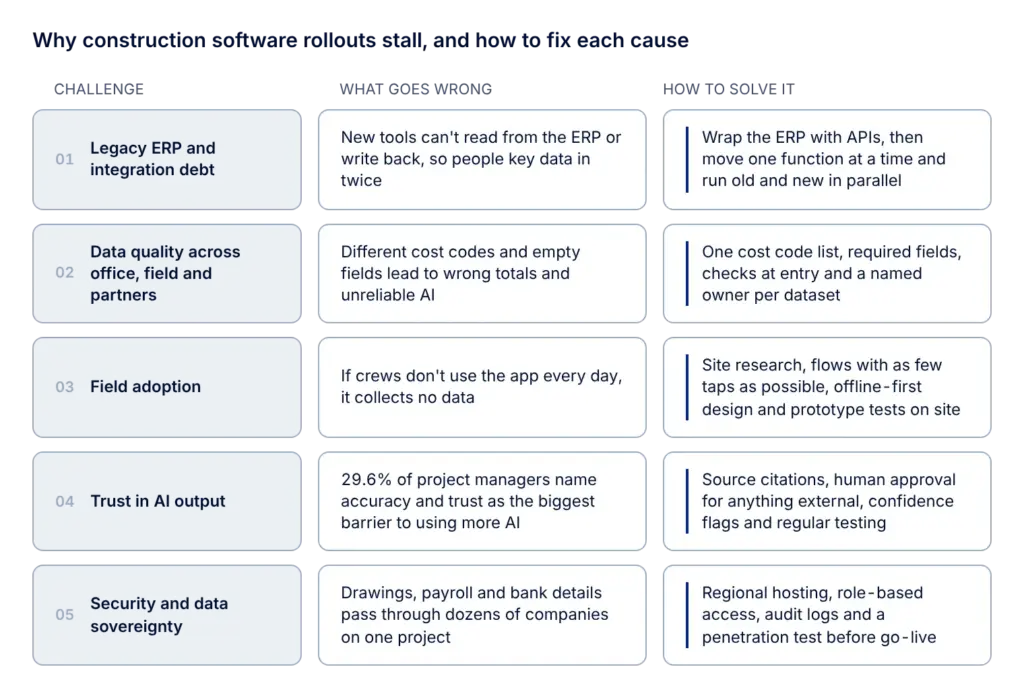
Most stalled rollouts we’ve seen trace back to old systems, messy data, crews who don’t use the tool or managers who don’t trust its output. Here is what separates the rollouts that stick from the ones that stall.
Legacy ERP and integration debt
Many contractors run accounting and payroll on an ERP set up years ago, often heavily customized. Any new platform has to read from it and write back to it, or people end up keying data in twice. Replacing the ERP in one go is rarely realistic, because payroll and month-end close can’t stop. A typical application modernization around an old ERP runs in five steps:
- Map what the system does today. Modules in use, custom fields, reports finance depends on, existing integrations and who uses what. This shows which parts are business-critical and which nobody has opened in years.
- Wrap it with APIs. An API layer exposes jobs, cost codes, vendors and payroll data to new tools without changing the ERP core. New field and PM tools can connect right away.
- Move one function at a time. Time entry might move first, then job cost reporting, while the general ledger stays in the old system until the end. Each step delivers value on its own and limits risk.
- Run old and new in parallel. During cutover, both systems process the same period, for example one payroll cycle, and the results get reconciled. Problems surface before the old module is switched off, and ERP data migration happens on verified data.
- Retire modules once they reconcile. The budget is spread across phases, and the business never faces a single high-risk go-live weekend.
One of our clients faced a version of this in 2015. Svenn’s original PHP system couldn’t scale, so we rebuilt it over six months and migrated the data without disrupting users. Svenn now reports 2x faster maintenance.
Data quality across office, field and partners
Analytics and AI need consistent input data, and project data from several sources is rarely consistent. Subcontractors use different cost code structures (one books concrete under MasterFormat 03 30 00, another under a custom “Concrete, misc.” code), and foremen often leave optional fields empty. Reports built on that data show wrong totals, and AI models trained on it give unreliable results.
Here’s what a data quality management project for a contractor usually fixes, how, and what each fix changes for the business:
- One cost code structure for every project and subcontractor. The company agrees on a master list (often based on MasterFormat or the company’s own work breakdown structure), map every legacy and subcontractor code to it, and lock the list in the ERP and field apps so nobody can invent new codes on site. For the business, job costs become comparable across projects, and estimators can reuse real unit costs in the next bid.
- Required fields and pick lists in the field app. Free text gives way to drop-downs for cost code, activity and equipment, and a daily log can’t be submitted without hours and a cost code. Payroll and job costing get complete records the same day, so nobody chases foremen for missing entries at month end.
- Validation at the moment of entry. Rules check each value as it’s typed: hours longer than the shift, quantities far outside the expected range, a cost code that isn’t active on this project. Errors get fixed by the person who knows the answer while they still remember it, not by accounting weeks later.
- One source for master data. Employee, project, vendor and equipment lists live in one system, usually the ERP, and sync to every other tool through APIs. A new hire or a closed project updates everywhere at once, and duplicates like “J. Smith” and “John Smith” stop splitting labor costs between two records.
- Clear ownership through data governance. Each dataset gets a named owner, for example the controller for cost codes and the fleet manager for the equipment list, along with rules for changes and a monthly report of missing or invalid entries per project. Problems have someone accountable for them, and data quality holds up after the rollout team leaves.
Field adoption
A field app collects data only if crews use it every day. That’s why adoption gets designed in from the first week of a project, usually through these steps:
- Site research. Before any design work, the team spends time on one or two active sites: what crews record, when, on which devices, and where the signal drops.
- Task flows with a tap budget. The handful of daily actions, such as clocking in, logging hours, adding a photo or closing a checklist item, get mapped first, and each one is designed to take as few taps as possible. Buttons are sized for gloves, and screens use high contrast so they stay readable in direct sunlight.
- Offline-first architecture. Entries are saved on the device and queued for sync, and the backend resolves conflicts when two people edit the same record without a connection.
- Prototype tests on site. Foremen try a clickable prototype on their own phones during UI/UX design, and the flows get reworked before anyone writes production code.
- Trade language and localization. Labels use the terms crews already use, and the interface supports the languages spoken on site.
- Rollout support. In-app hints, a short guide and one champion per crew help the first project switch from paper without a drop in reporting.
Trust in AI output
Project managers use AI often but don’t fully trust it. In Mastt’s 2026 study, 29.6% named accuracy and trust as the biggest barrier to using more AI, while only 3.7% named cost. AI features that project managers can rely on usually include these safeguards:
- Source citations. Every answer links to the document, page or record it came from, so a PM can check a number in seconds before it goes to the owner.
- Human approval for anything external. Owner reports, RFI responses and change order summaries go out only after a person approves them. The company keeps control over what it commits to in writing.
- Confidence flags. Answers with weak supporting evidence are marked as such and never sent automatically.
- Logging and regular testing. Prompts, sources and outputs get logged, and the system is tested against a set of known answers after every change. Errors get caught before users notice them, and there’s a record if a dispute comes up later.
- Permission-aware access. The AI sees only the documents the current user is allowed to see, so pricing and HR data don’t leak through a chat window.
Security and data sovereignty
Project data includes drawings of critical infrastructure, payroll and bank details, and dozens of companies touch it during a single project. These questions are best settled at the design stage, as part of cybersecurity services:
- Where the data is stored. Hosting in the right region meets the data residency terms in public contracts and keeps the company eligible for those bids.
- Who can see what. Role-based access per project means a subcontractor sees only its own packages, not other trades’ pricing or the full drawing set.
- What happens when a contract ends. Access is removed automatically when a subcontractor or employee leaves the project, instead of depending on someone remembering to do it.
- How devices are protected. Data is encrypted in transit and at rest, including on phones and tablets that get lost on site.
- Who did what. Audit logs record who viewed, downloaded or changed each file, which gives the company evidence in disputes and compliance checks.
- Whether it holds up. A penetration test before go-live finds weak points while they’re still cheap to fix.
How to start connecting your construction software in 90 days
Based on our experience, the approach that works is to map the whole stack first, then connect the one hand-off that costs the most, prove it on a live project and extend from there. Here’s how we’d plan the first 90 days.
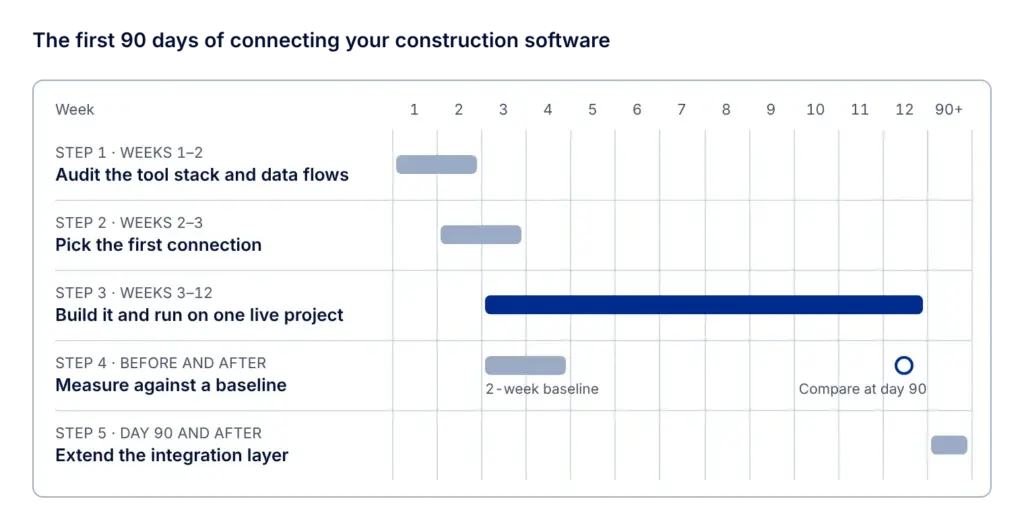
Step 1. Audit your tool stack and data flows (weeks 1–2)
List every system that touches a project: estimating, scheduling, the PM platform, field apps, document management, the ERP, payroll, equipment telematics and the spreadsheets that fill the gaps between them. For each one, note who owns it, what data it holds and whether it has an API or only exports files.
Then follow one real record through the stack. For a daily log, that might look like this: the foreman enters crew hours in a field app, the project manager copies them into the owner report, and a payroll clerk types them again into the ERP. Every point where someone retypes a number is a broken connection.
Step 2. Pick the first connection to build (weeks 2–3)
Rank the broken hand-offs from the audit by three questions:
- How many hours a week does it cost across the team?
- How much risk does it carry? Late change orders and wrong payroll cost more than a slow report.
- How hard is it to connect? A system with a documented API is a week of work. A legacy ERP with file exports only is a project of its own.
Look for a hand-off that costs a lot of time and connects two systems that already have APIs. For many contractors that’s field hours flowing into payroll and job costing, or change orders flowing from the PM platform into accounting.
At the same step, check the data itself. If three projects use three different cost code lists, cleaning them up comes first in any data integration services engagement. Otherwise the integration will just move bad data faster.
Step 3. Build the connection and run it on one live project (weeks 3–12)
Design the connection as part of a shared integration layer from day one, even if it carries only one data flow at first. Point-to-point scripts between two tools are faster to write but turn into the next tangle by the third integration. Good API integration builds a layer of APIs with one shared data model, so each new system plugs in the same way.
Then switch it on for one typical mid-size project with a superintendent who’s open to trying something new. Avoid the flagship job and the one that’s already in trouble: neither gives you a fair test. Agree upfront on who checks the synced data, how errors get flagged and the date of the go/no-go review. A short weekly check-in with the project team catches mapping errors while they’re still cheap to fix.
Step 4. Measure against a baseline (before and after)
Record three or four numbers for two weeks before the connection goes live, on the same project, then compare them at day 90.
| Metric | How to measure | Where the data comes from |
|---|---|---|
| Hours spent retyping data | Time per week on manual entry for the connected hand-off | Timesheets, a two-week time log |
| Delay between systems | Days from entry in the source system to arrival in the target | Timestamps in both systems |
| Data errors | Mismatches found in reconciliation or payroll corrections | Accounting, payroll records |
| Report preparation time | Hours to build the weekly owner report | PM team time log |
A simple project view built through dashboard development keeps these numbers in front of the project team and management every week, even before your BI tool can read from the new integration layer.
Step 5. Extend the integration layer (day 90 and after)
At the go/no-go review, fix what broke and decide what to connect next. Extend in this order: the same connection on more projects, then the next hand-off from your Step 2 ranking, then the harder legacy systems. If an old ERP blocks the way, plan an application modernization in stages, starting with the part the next connection depends on.
This is how connected platforms grow in practice. Svenn went from manual invoice exports to real-time syncs with 10+ accounting systems, including Visma, PowerOffice Go and Tripletex, one integration at a time, with the same dedicated team carrying the product knowledge forward.
Construction software we’ve built for Svenn and Biderator
Svenn: from a time-tracking tool to a construction platform
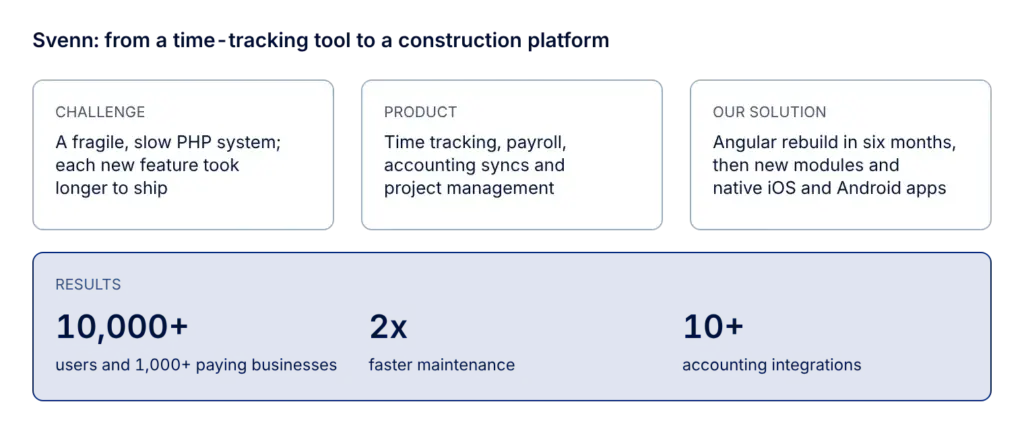
Svenn is a construction software company from Oslo, Norway. It started in 2013 as 24onoff, a time-tracking tool for builders. When Svenn brought in Relevant Software in 2015 to expand the product, the original PHP system was fragile and slow, and each new feature took longer to ship than the last.
We started with the foundation. Over six months, the team rebuilt the app in Angular, migrated data without disrupting users, modernized the backend, automated deployments on AWS and added performance monitoring. Then the product grew module by module:
- Time tracking turned into a full work-hour system with absences, overtime and payroll integrations.
- Manual invoice exports became real-time syncs with accounting tools such as Visma, PowerOffice Go and Tripletex.
- Project management gained deviation tracking, document storage and advanced scheduling.
- Native iOS and Android apps put all of it in the hands of field crews.
What changed:
- 10,000+ users and 1,000+ paying construction businesses
- 12 product modules and 10+ accounting integrations
- 2x faster maintenance
- 4.5/5 software rating
- A partnership that has lasted 10 years
“Relevant Software is very clear in communication, and they execute the projects with the same quality as if it were their own. They come up with ideas and improvements to ensure that the solution is as good as it can be. Give them the really challenging tasks, the ones that everyone else is struggling with, and they will get them done.”
Ole Jørgen Næss, VP of Product and Engineering at Svenn
Biderator: a construction bidding MVP in 4 weeks
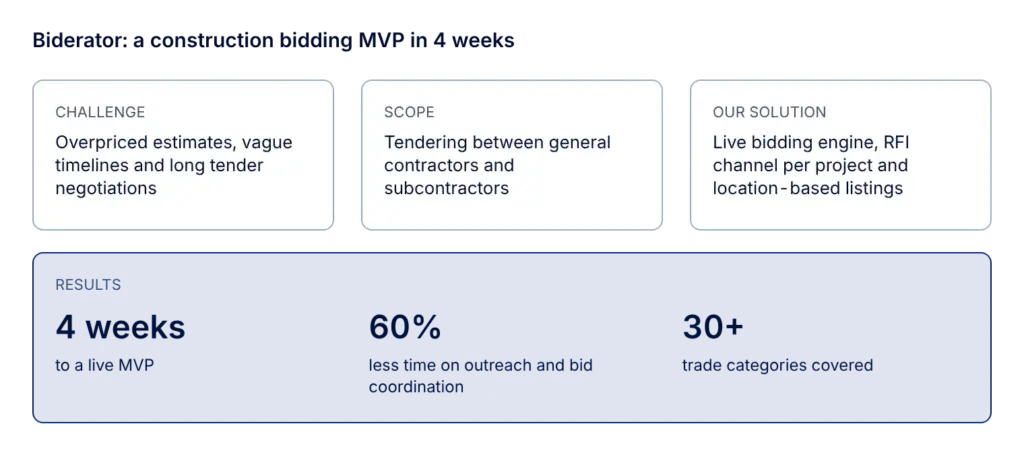
Biderator is a U.S. construction technology startup from New Jersey, founded in 2017 by Vahid Walker, who has more than 20 years of experience in construction. The company set out to fix overpriced estimates, vague timelines and long negotiations in construction tendering with a digital auction system where general contractors and subcontractors could find each other and compete for jobs.
The request was to deliver scalable MVP for a construction tendering platform: simpler coordination between general contractors and subcontractors, full bid visibility, and room for future bonus and internal payment tools. The team delivered a live bidding MVP in 4 weeks, with:
- Project creation with live updates, so scope changes and document uploads notify contractors automatically.
- An RFI channel inside each project.
- A bidding engine that shows the live high and low bid range and the total number of submissions.
- Location-based listings of subcontractors near the project site.
- Project dashboards, real-time messaging and filtered listings.
- Profile galleries, trade-specific filters and verified reviews.
- A scalable backend ready for token systems and referral logic.
What changed:
- 60% less time spent on contractor outreach and bid coordination
- 60% faster project turnaround
- Full bid visibility for contractor selection
- 30+ trade categories covered
- A live MVP in 4 weeks
“We needed skilled staff and no downtime, which is what they’ve delivered.”
Vahid Walker, founder of Biderator
Build your next construction platform with Relevant
The trends in this article share one thread. Construction companies get value from technology when their software connects the office, the field and the equipment, and when the data in it is good enough to act on. Off-the-shelf tools cover a lot of that. Custom software makes sense when your workflow is the thing that sets you apart, when the tools you have can’t talk to each other, or when you’re building a construction tech product of your own.
Relevant Software is a nearshore development partner with teams in Ukraine, Poland and Spain, rated 4.9 on Clutch. Our construction software development work covers ERP, project management, bidding, scheduling, cost estimation, equipment management and integration with construction machines. We start every project with discovery, so the first release solves the problem you actually have.
Planning a new platform, an AI feature or a rebuild of an old system? Contact us. We reply within 24 hours and can send a proposal with estimates, timelines and team CVs under NDA.
FAQ
What are the construction technology trends for 2027?
The main construction software trends for 2027 are unified platforms that replace disconnected tools, AI in estimating, bidding and reporting, AI agents for RFIs and submittals, mobile-first field apps with offline sync, and data platforms for predictive analytics. IoT and connected equipment, BIM-based digital twins, reality capture, prefab software and carbon tracking round out the list.What are the newest technologies in construction?
AI agents that handle document workflows are the newest addition to construction software. In Mastt’s 2026 study, only 9.3% of project managers used them, but 46.3% planned to start. Computer vision for progress tracking and digital twins built on as-built BIM models are also moving from pilots into everyday project use.How is AI used in construction software today?
Contractors use AI most for cost estimation and budgeting (24%) and bid management (22%), according to ServiceTitan’s 2026 report. Project managers also use it to draft reports, summarize meetings and search project documents. The best results come when AI sits inside a tool the team already uses.When does custom construction software make sense?
Custom software is worth it when your workflow sets you apart, when your current tools can’t share data, or when you’re building a construction tech product to sell. If an off-the-shelf tool covers most of your process and integrates with your ERP, buying it is usually cheaper.How long does it take to build a construction software MVP?
From our experience, it depends on scope and on how many systems the product has to connect to. A focused MVP for one workflow can go live in weeks: for Biderator, our team delivered a live bidding MVP in 4 weeks.Rebuilding a mature platform takes longer. When we started working with Svenn, rebuilding its PHP system in Angular took six months, and only after that did new modules, mobile apps and accounting integrations follow.


