
Automated Document Processing: From Unstructured Documents to Usable Data
 Andrew BurakCEO and Founder at Relevant Software
Documents still drive much of the business work. Invoices arrive as PDFs, claims come as scanned packets, and contracts hide key details in long text. Someone often retypes data so systems can move forward, and the process slows down when volume grows or formats change. Automated document processing turns unstructured documents into structured data that downstream systems can use. The goal is steady turnaround, fewer mistakes, and less rework when the same issues repeat. A solid setup adds checks and clear review paths, so the workflow stays reliable, not fragile.
This guide explains how automated document processing works, how it differs from basic OCR, and which technology components matter in real-world operations. You’ll also see use cases by industry and a build vs buy view for teams searching for data strategy consulting services.
What is automated document processing?
Before tools, models, and architecture, it helps to pin down the definition in plain business terms, because teams often use the same words for very different setups.
Automated document processing is a workflow that converts documents (scans, PDFs, emails, images, web forms, even “free-text chaos”) into structured data and routed decisions. It typically combines document capture, classification, data extraction, validation, and system integration to enable downstream steps to run with minimal manual intervention.
Definition and core purpose
At its core, the goal stays simple: move information from a human-friendly format into a system-friendly format, with confidence levels, exception paths, and traceability.
In practice, strong implementations aim for three outcomes:
- Operational speed: reduce queue time between intake and action
- Data accuracy: reduce rework and downstream fixes
- Control: keep an audit trail of what came from where, who approved what, and why
Structured vs unstructured documents
Documents arrive in three broad categories, each with its own technical approach and expected accuracy.
| Document type | What it looks like | Typical examples | Why is it tricky |
| Structured data | Fixed fields, fixed layout | Web forms, EDI exports, fixed CSV templates, standardized portals | Easy to parse, but often inconsistent exports across vendors |
| Semi-structured data | Familiar layout with variation | Invoices, POs, packing lists, bills of lading, bank statements | Layout shifts by supplier, region, or template version |
| Unstructured data | Free text, mixed signals | Contracts, emails, support tickets, medical notes, and incident reports | Meaning lives in language, not in boxes |
A useful mental model: the more the document relies on interpretation, the more the system needs AI document processing techniques such as natural language processing and document processing machine learning.
The key point now is selecting the tool. Document structure defines how much the system can rely on layout versus language, and it also defines the risk of downstream errors. When documents vary, a workflow needs classification, extraction, validation, and traceability, not only readable text. That is where OCR (Optical Character Recognition) reaches its ceiling, and where automated document processing starts to earn its keep.
Related: Unstructured data in healthcare.
How automated document processing differs from basic OCR
OCR solves a narrow problem: it turns scanned pages and images into readable text. That output helps, yet it often arrives as a long string with no structure, no field boundaries, and no guarantee that “Total” truly maps to the total your ERP expects, especially when document formats vary, or the file includes handwritten text.
Automated document processing treats OCR as one input signal, not the finish line. The pipeline identifies the document type, extracts specific fields, and ties them to a data model that business systems can consume. Behind the scenes, computer vision supports layout understanding, deep learning improves extraction across template variation, and basic noise reduction improves accuracy on low-quality scans. The result is better data capture and cleaner data processing, not only text on a screen.
That difference is why teams use Intelligent Document Processing (IDP). An idp solution applies Artificial Intelligence (AI) to classify documents, extract meaning from layouts, tables, and text, and handle exceptions when templates shift or documents contain ambiguity. In plain terms, OCR reads the page; automated document processing makes the page operational by turning relevant information into usable data points and processed data.
Why manual document work breaks at scale
Manual review can work when document volumes remain low and the process remains stable. The moment volume spikes, templates change, or compliance asks for evidence, manual document processing starts to behave like a leaking pipe: the fix always seems small, yet the floor stays wet. What begins as manual processing and a bit of manual data entry turns into a queue of repetitive tasks that drains time from higher-value work across business operations.
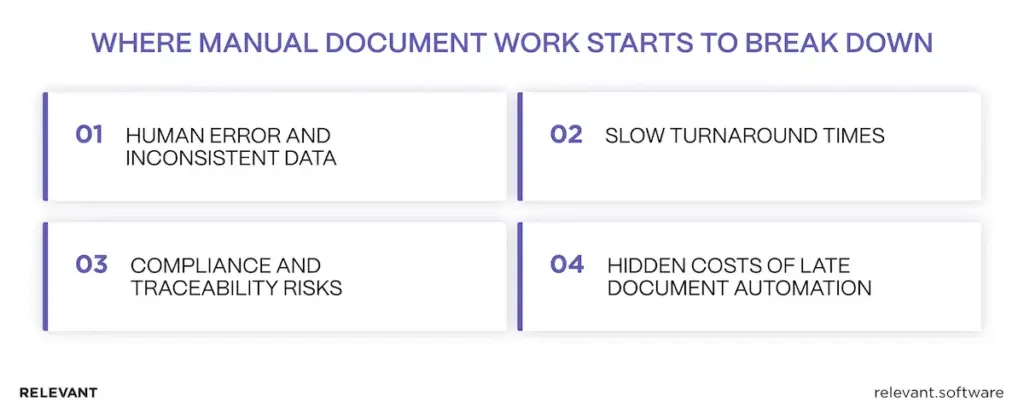
Human error and inconsistent data
People stay good at judgment and context, yet data entry across hundreds of business documents creates predictable failure modes. The issue rarely comes from incompetence. It stems from fatigue, shifting templates, and tools that treat humans as universal parsers. Common patterns show up across industries:
- Transposed numbers in invoice totals or policy IDs
- Conflicting versions of the same document across email threads
- “Creative” abbreviations that break downstream checks
- Missing fields that look harmless until the month-end close
Teams usually reduce this chaos only after they put stronger foundations in place, including clearer field definitions, stronger data validation, and ownership aligned with business needs. That is also where process automation starts to pay off, as it standardizes how teams process data rather than relying on individual habits.
In practice, data management services help teams define consistent data structures and ownership, so that the same document does not lead to different interpretations across departments.
Slow turnaround times: document processing automation hits a wall
Speed is where the pain becomes visible to leadership, because delays manifest as late payments, slow onboarding, or growing backlogs. Queues form for reasons that look minor in isolation:
- Someone waits for a teammate to “confirm the value.”
- A document arrives after business hours, then sits untouched
- An unclear field triggers a manual check, then stalls the whole item
When documents feed revenue, risk, or customer experience, the real cost of delay often exceeds the labor cost. This is also where many “lightweight” approaches fail: partial automation that still requires manual babysitting does not scale. When legacy systems impede clean integration, robotic process automation (RPA) services can help build a bridge while the core workflow moves toward a stable document-processing solution that reduces processing time and improves overall operational efficiency.
Compliance and traceability risks in automation document processing
Regulated workflows demand proof, not intent. Auditability depends on lineage, access control, and consistent decision logs. Typical risk areas include:
- No evidence trail for who approved the extracted data
- No version history for source documents and derived fields
- Weak controls around unauthorized access to sensitive files
- Inconsistent retention rules across systems and teams
This is where governance frameworks help. NIST’s AI Risk Management Framework, for example, outlines structured ways to manage AI risks across design, deployment, and monitoring. In practice, governance also protects data security, especially when documents move between inboxes, shared drives, and cloud storage. For teams that need support applying those controls in real workflows, AI development services can translate governance into practical implementation, with auditability built in.
Hidden costs when teams automate document processing too late
The real cost of manual document work often doesn’t surface in the first review. It shows up later, when incorrect data moves into other systems and has to be fixed multiple times. Each correction involves more people, more tools, and more delays.
Common hidden costs include repeated rework between operations and finance, customer support spending time chasing missing documents, engineers rushing to patch fragile scripts, and teams losing confidence in reports because the data is unreliable. In areas like HR and healthcare, these issues can slow down employee onboarding and even create errors in patient records — where accuracy really matters.
A practical rule: if a workflow produces recurring exceptions, the fix needs a system-level design, not another “temporary” spreadsheet. That is where automated document summary and processing becomes useful, because it replaces ad hoc fixes with a repeatable pipeline that supports document classification, produces validated data, and keeps digital files consistent across a wide range of sources, from scanned PDFs to digital form submissions.
Over time, this kind of document process automation also unlocks cost savings and higher customer satisfaction, because downstream teams work with consistent, trusted outputs.
How automated document processing works
Most teams picture a clean three-step flow: scan, extract, save. Production reality looks messier. Documents arrive from five places, formats vary, templates change, and the “one field” someone missed becomes a week of rework. Solid automated document processing solutions are expected to handle chaos and still produce structured, auditable data.
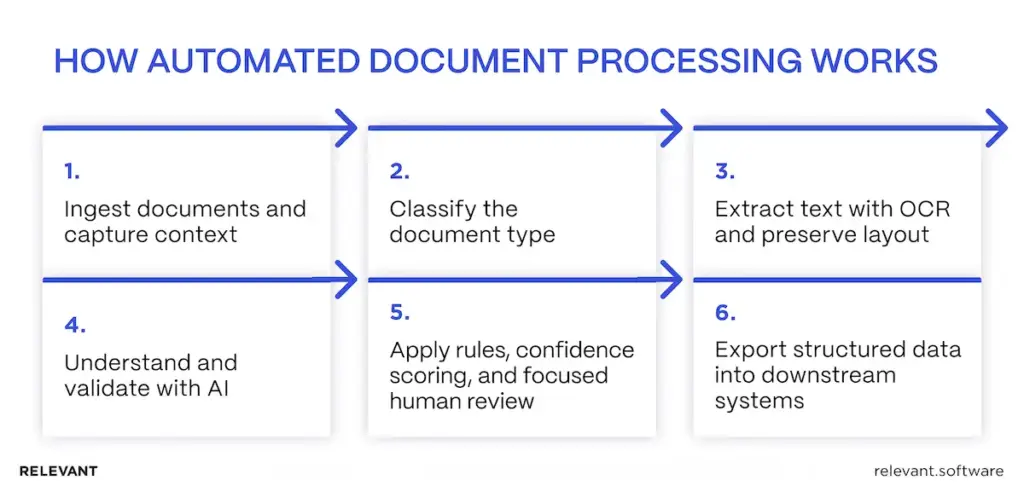
Step 1: Ingest documents and capture context
Work starts with intake from email, portals, scanners, shared folders, or APIs. The system normalizes files and captures metadata, such as source, time, and document owner, so that downstream actions remain traceable.
Step 2: Classify the document type
The pipeline identifies whether the document is an invoice, claim, contract, or statement. Classification chooses the right extraction method and validation rules. Without it, different documents get treated the same way, and mapping errors appear fast.
Step 3: Extract text with OCR and preserve layout
Optical Character Recognition (OCR) converts scanned pages and images into text. The pipeline also reads layout signals because business data is stored within headings, key-value blocks, and tables. Correct words in the wrong column still break finance workflows.
Step 4: Understand and validate with AI
Artificial Intelligence (AI) models extract fields such as names, dates, totals, policy IDs, and addresses, even when templates vary. Validation then checks extracted values against business logic, so the system confirms “the right number,” not only “a number.”
Step 5: Apply rules, confidence scoring, and focused human review
Each field receives a confidence score. High-confidence cases pass through. Low-confidence cases are sent to a reviewer, with the source snippet highlighted and the reason for escalation shown. Review stays targeted, so people confirm only what the system cannot prove.
Step 6: Export structured data into downstream systems
Validated outputs are delivered to ERP, CRM, claims platforms, document management systems, and analytics layers. Integrations can use APIs, events/queues, or RPA to connect to legacy tools. The key is a stable data model and an audit trail that links every record back to the original document.
This is also where tool choice starts to matter. Automatic document processing tools often look similar in demos, but in production, they separate the winners from the “nice UI” options. The best intelligent document processing software handles messy layouts and exceptions without turning every edge case into a manual task. For teams that rely on document AI for classification and extraction, an automated document management system helps keep versions, access, and search under control, so the workflow stays stable as volumes grow.
Key technologies behind automated document processing
Automated document processing succeeds when components work as a pipeline rather than as separate tools. If the terms start to blur, intelligent document processing provides a clear, practical foundation. The sections below break down what each technology contributes and where the workflow automation technology stack tends to fail in production.
| Technology area | What it does in automated document processing | Best fit documents | What to evaluate | Common production pitfalls |
| OCR engines | Converts scans and images into machine-readable text | Scanned PDFs, photos, fax-like inputs | Accuracy on low-quality scans, language support, handwriting limits, speed, and cost per page | “Readable” text but missing characters, broken numbers, low accuracy on stamps, and skewed scans |
| Layout recognition | Detects structure: tables, columns, headers, key-value blocks | Invoices, statements, shipping docs, forms | Table extraction quality, multi-page tables, rotated pages, template drift handling | Correct words mapped to wrong fields, line items merged or split incorrectly |
| Machine learning classification | Identifies document type and routes it to the right extraction and rules | Mixed batches from email/portals | Accuracy by document type, training effort, handling new templates, and confidence thresholds | Misclassification sends docs down the wrong pipeline, then validation fails late |
| NLP (Natural Language Processing) | Extracts meaning from text: entities, clauses, intent, relationships | Contracts, emails, notes, narratives | Entity accuracy, domain vocabulary support, evidence links to source text, and ambiguity handling | “Looks correct” summaries that miss key qualifiers, weak performance on jargon, and negation |
| Validation rules engine | Applies business logic and reconciliation to extracted fields | All document types | Cross-field rules, master data checks, configurable workflows, versioning | Rule sprawl, inconsistent rules across teams, brittle logic that breaks after process changes |
| Confidence scoring + human-in-the-loop | Flags uncertain fields and routes only the right cases to reviewers | High-risk or variable docs | Field-level confidence, reviewer UI speed, audit trail of decisions, and feedback loop | Review queues become a second full process, with low transparency on why a case escalated |
| Integration layer (APIs, queues, RPA) | Pushes structured data into ERP/CRM/DMS/data platforms and triggers workflows | All document types | API reliability, idempotency, retries, auth, event logs, RPA as fallback for legacy | “Export to spreadsheet” trap, duplicate writes, broken retries, fragile UI automation |
| Security + governance | Controls access, retention, and traceability from source to record | Regulated and sensitive workflows | Role-based access, encryption, audit logs, retention policies, and data residency | Unauthorized access risk, incomplete logs, unclear lineage, compliance gaps during audits |
With the tech stack clear, the next step is to choose where it creates value quickly without increasing risk. Documents may look similar, but their business role changes everything: the same PDF might trigger a payment, unlock onboarding, support a claim decision, or become evidence in a dispute. That difference drives how strict validation should be, how exceptions get handled, and how much human review stays in the loop. With that context, here are the most common use cases by industry.
Common use cases by industry
Documents look universal until you try to automate them. The same PDF can mean “pay this,” “approve this,” or “this would be helpful in court later,” and those differences drive the design.
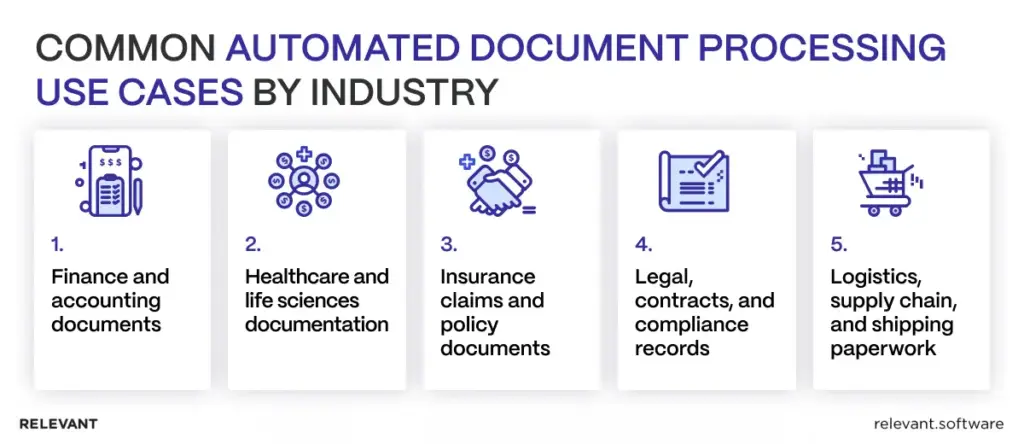
- Finance and accounting documents (invoices, receipts, statements)
Accounts payable workflows reward precision. Strong systems extract invoice numbers, totals, line items, and tax details, then validate against purchase orders and vendor records. The best result is not only speed, but a measurable drop in rework and duplicate payments.
- Healthcare and life sciences documentation
Healthcare mixes semi-structured forms with unstructured narratives. The priority often shifts toward privacy controls, selective redaction, access tracking, and traceability because governance rules are strict and the data sensitivity is high.
- Insurance claims and policy documents
Claims processing involves many document types, frequent exceptions, and real financial consequences. A pipeline needs confidence scoring, structured review flows, and consistent evidence for why a claim moved forward or was flagged.
- Legal, contracts, and compliance records
Legal documents require context. Extraction must identify clauses, obligations, renewal terms, and exclusions, then link every output back to the original wording. NLP helps, but reviewer tooling often decides whether teams trust the system.
- Logistics, supply chain, and shipping paperwork
Shipping documents come with identifiers, timestamps, and international variations. Automation supports proof of delivery, customs documents, dispute resolution, and SLA reporting, especially when delays result in customer churn.
Build vs buy: choosing the right document processing approach
This decision becomes easier when it is framed as risk management. The question is not “custom or platform,” but “what level of control and integration does this workflow require?”
When off-the-shelf tools are sufficient
Off-the-shelf tools are a good fit when templates remain stable, exceptions are rare, and the workflow has low regulatory risk. They’re also a good fit when integrations are light and teams can operate comfortably within the platform’s constraints.
When is custom automated document processing the safer choice?
Custom solutions make sense when documents vary widely, integrations run deep across multiple systems, and compliance demands strong traceability and auditability. They’re also the safer option when the workflow directly impacts revenue or risk control, and the organization needs full ownership over validation rules, exception handling, and data quality controls.
Cost, flexibility, and ownership trade-offs
Platforms reduce upfront build time, but pricing models, customization limits, and vendor roadmaps can become constraints at scale. Custom solutions cost more up front, yet they often reduce long-term friction by aligning extraction, validation, governance, and integration with the exact workflow.
Compliance and data residency considerations
When documents contain sensitive data, residency and access control stop being IT preferences and become business requirements. The safest approach enforces least-privilege access, keeps versioned audit logs, and maintains clear traceability from the source document to every downstream record, without relying on manual side processes that tend to fall apart during an audit.
Best practices for successful automated document processing
Automated document processing technology succeeds when teams treat it like an operational pipeline with guardrails, not a clever demo that reads PDFs. These practices keep accuracy, speed, and auditability moving in the same direction, which is harder than it sounds.
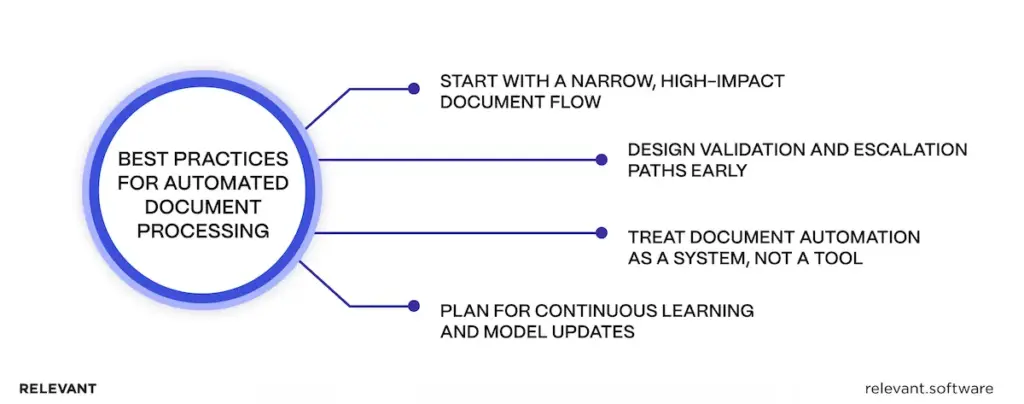
Start with a narrow, high-impact document flow
Pick one workflow where the pain shows up in a metric rather than in complaints.
- Choose a “money or risk” flow first: invoices stuck in approval, claim packets that slow payouts, and onboarding docs that block activation.
- Define success in plain numbers: cycle time, straight-through rate, exception rate, and rework hours.
- Lock the scope on purpose: one document type, one business unit, one downstream system, one review path.
A narrow start also reduces the classic project surprise: “We automated invoices” quietly turns into “We automated invoices, credit notes, statements, and whatever arrived in the inbox.”
Design validation and escalation paths early
Extraction quality matters, but trust comes from controls.
- Validate what the business already knows: totals vs line items, required fields, approved vendor lists, policy formats.
- Escalate at the field level, not the document level: reviewers confirm only the uncertain pieces.
- Show evidence, not guesses: highlight the source snippet and explain why the case escalated.
- Log decisions by default: who approved what, when, and based on which source version.
If escalation feels like a black box, reviewers will re-check everything “just to be safe,” and the queue returns with a vengeance.
Treat document automation as a system, not a tool
Tools extract data. Systems run operations.
- Standardize the data model: define what each field means and designate which field serves as the source of truth.
- Build reliable integrations: retries, idempotent writes, and clear error handling so “temporary failures” stay temporary.
Design for security from day one: least-privilege access, controlled exports, and retention rules. - Monitor the pipeline like production software: exception spikes, template drift, confidence score shifts.
The fastest way to kill ROI is to build a pipeline that ends with “export to spreadsheet.”
Plan for continuous learning and model updates
Documents change. Vendors change. People keep inventing new templates when no one is watching.
- Capture reviewer corrections: feed fixes back into model tuning and rules.
- Track drift: watch accuracy and exception rates by vendor, template, and channel.
- Version everything: models, rules, templates, and mappings need controlled releases.
- Add rollback paths: updates should be reversible without chaos.
If change control is missing, model updates can behave like silent schema changes, and operations teams will notice first, usually on the busiest day.
When to involve a custom development partner
Off-the-shelf tools can carry simple flows. Custom development makes sense when the workflow has a real business impact, high variability, or deep integration requirements.
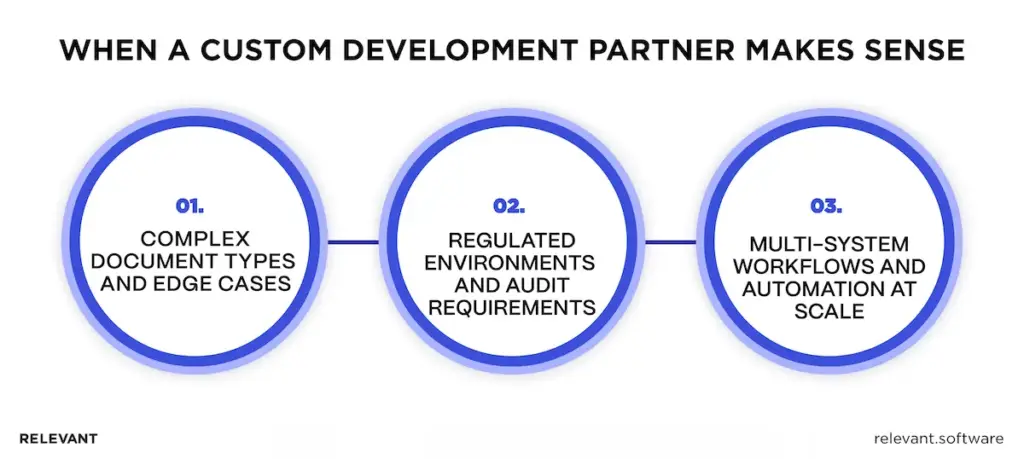
Complex document types and edge cases
Some documents look simple until they hit production.
- Multi-page tables and line items that shift columns or repeat headers
- Supplier template variation across regions and subsidiaries
- Mixed content where key data sits in tables plus free-text notes
- Low-quality scans with stamps, watermarks, and handwritten edits
Custom development helps teams design extraction and validation around the document reality, not the marketing sample set.
Regulated environments and audit requirements
Regulation raises the standard from “probably correct” to “provably correct.”
- Field-level lineage: link every extracted value to the source evidence
- Access control: prevent unauthorized access, enforce role-based permissions
- Audit trails: decisions, approvals, and version history that hold up under review
- Retention rules: consistent policies across systems, not folder folklore
When audits matter, governance cannot sit on the side as a nice-to-have.
Multi-system workflows and automation at scale
Automation pays off only when data lands cleanly where work happens.
- ERP + CRM + DMS + data platform workflows with consistent data contracts
- Event-driven processing for reliability under volume spikes
- Legacy systems that need RPA as a bridge, not as the main architecture
- Monitoring and alerting that catches failures before backlogs explode
Custom engineering keeps integrations durable, which is where many projects either become boring and reliable or noisy and expensive.
When these conditions show up, the target shifts from “extract data” to “keep the entire workflow dependable.” That is where a strong partner earns its place: the work includes process design, clear exception paths, and a rollout that survives real volume and real variance, not just model selection.
In many cases, teams also need a better backbone for document storage, access, and search, so building a document management system becomes a logical next step. This is where speed matters, but stability matters more.
Automated document processing with Relevant Software
Need automated document processing that still works when things get messy? Our team keeps the work practical and calm. We start by understanding how documents move today, where items stall, and what “good data” means for the people who rely on it. That alone removes a lot of hidden friction.
Then Relevant builds a solution that fits the workflow instead of forcing the workflow to fit a tool. As volume grows and formats change, the process stays steady, so teams stop chasing missing details and fixing the same mistakes twice. The day-to-day impact stays simple: faster turnaround, fewer manual checks, and fewer “quick questions” in Slack. Once the data becomes reliable, business intelligence consulting helps teams turn that flow into clear reporting and better decisions. Contact us to discuss the document flow that causes the most delays today.